
解決 .NET Docker 容器中缺少字型檔的問題
之前公司的維運同事說我的 CI/CD 和環境相關能力需要加強。 我仔細想想也是,天分有限,再繼續研究 .NET 的進步空間也不大。 結果最近在研究 WSL,卻因為權限問題被卡住,搞了快一個月也沒寫出一篇筆記。 反而在空閒時間又寫了幾篇 .NET 的筆記。 但後來仔細想想,好像之前有處理一個 Docker 的問題,可以勉強掰出一篇筆記,證明我有在研究 XD。
Docker 容器中的字型問題
在 Linux 系統中,字型檔案通常位於「/usr/share/fonts」路徑底下,如下圖所示,可以看到裡面有一個「truetype」資料夾,存放著字型檔案。
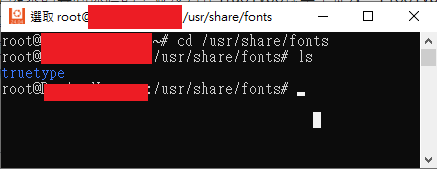
使用 Dockerfile 建立的 Linux 容器(Container)中,可能會發現「/usr/share/」路徑下缺少「fonts」資料夾。例如,使用 Visual Studio 建立專案所產生的 Dockerfile:
FROM mcr.microsoft.com/dotnet/aspnet:6.0 AS base

WORKDIR /app
EXPOSE 80
EXPOSE 443

FROM mcr.microsoft.com/dotnet/sdk:6.0 AS build
ARG BUILD_CONFIGURATION=Release
WORKDIR /src
COPY ["TestFont6/TestFont6.csproj", "TestFont6/"]
RUN dotnet restore "./TestFont6/TestFont6.csproj"
COPY . .
WORKDIR "/src/TestFont6"
RUN dotnet build "./TestFont6.csproj" -c $BUILD_CONFIGURATION -o /app/build

FROM build AS publish
ARG BUILD_CONFIGURATION=Release
RUN dotnet publish "./TestFont6.csproj" -c $BUILD_CONFIGURATION -o /app/publish /p:UseAppHost=false

FROM base AS final
WORKDIR /app
COPY --from=publish /app/publish .
ENTRYPOINT ["dotnet", "TestFont6.dll"]容器執行起來,可以看到缺少「fonts」資料夾。

這應該是mcr.microsoft.com/dotnet/aspnet:6.0 使用了較精簡的 Linux 基礎映像檔(如 Debian、Alpine 等),這些映像檔(Image)通常僅包含最基本的系統套件,為了減少大小,不會預裝許多常見的字型套件。
為了解決這個問題,可以對 Dockerfile 進行以下調整:
FROM mcr.microsoft.com/dotnet/aspnet:6.0 AS base

RUN sed -i'.bak' 's/$/ contrib/' /etc/apt/sources.list
# 更新套件清單並安裝 ttf-mscorefonts-installer 和 fontconfig 這兩個套件
RUN apt-get update; apt-get install -y ttf-mscorefonts-installer fontconfig
# 使用 fc-cache 命令重新整理字型快取,最佳化字型加載速度
# -f 強制重新整理快取
# -v 顯示詳細資訊
RUN fc-cache -f -v

WORKDIR /app
EXPOSE 80
EXPOSE 443

FROM mcr.microsoft.com/dotnet/sdk:6.0 AS build
ARG BUILD_CONFIGURATION=Release
WORKDIR /src
COPY ["TestFont6/TestFont6.csproj", "TestFont6/"]
RUN dotnet restore "./TestFont6/TestFont6.csproj"
COPY . .
WORKDIR "/src/TestFont6"
RUN dotnet build "./TestFont6.csproj" -c $BUILD_CONFIGURATION -o /app/build

FROM build AS publish
ARG BUILD_CONFIGURATION=Release
RUN dotnet publish "./TestFont6.csproj" -c $BUILD_CONFIGURATION -o /app/publish /p:UseAppHost=false

FROM base AS final
WORKDIR /app
COPY --from=publish /app/publish .
ENTRYPOINT ["dotnet", "TestFont6.dll"]這樣一來,「/usr/share/fonts」路徑底下就會有「truetype」資料夾。

處理 .NET 8 Dockerfile 的問題
在使用 .NET 8 的 Dockerfile 時,以上方法會遇到以下錯誤:
#5 ERROR: process "/bin/sh -c sed -i'.bak' 's/$/ contrib/' /etc/apt/sources.list" did not complete successfully: exit code: 21根據錯誤訊息檢查「/etc/apt/」路徑底下,發現只有「sources.list.d」資料夾,而沒有「sources.list」檔案。

根據文章「Sources.list file is missing in debian12」來看,mcr.microsoft.com/dotnet/sdk:6.0 這個映像檔使用的 Linux 發行版本是 Debian 11,而 mcr.microsoft.com/dotnet/sdk:8.0 改為使用 Debian 12。 而在 Debian 12 使用,套件管理改為使用「/etc/apt/sources.list.d/debian.sources」的檔案。
以下是針對 .NET 8 的 Dockerfile 進行調整:
FROM mcr.microsoft.com/dotnet/aspnet:8.0 AS base

# 在 /etc/apt/sources.list.d/debian.sources 文件中尋找符合 Components: main 的行,並在該行的末尾增加 contrib。
RUN sed -i 's/^Components: main$/& contrib/' /etc/apt/sources.list.d/debian.sources
# 更新套件清單並安裝 ttf-mscorefonts-installer 和 fontconfig 這兩個套件
RUN apt-get update; apt-get install -y ttf-mscorefonts-installer fontconfig
# 使用 fc-cache 命令重新整理字型快取,最佳化字型加載速度
# -f 強制重新整理快取
# -v 顯示詳細資訊
RUN fc-cache -f -v

USER app
WORKDIR /app
EXPOSE 8080
EXPOSE 8081

FROM mcr.microsoft.com/dotnet/sdk:8.0 AS build
ARG BUILD_CONFIGURATION=Release
WORKDIR /src
COPY ["TestFont/TestFont.csproj", "TestFont/"]
RUN dotnet restore "./TestFont/TestFont.csproj"
COPY . .
WORKDIR "/src/TestFont"
RUN dotnet build "./TestFont.csproj" -c $BUILD_CONFIGURATION -o /app/build

FROM build AS publish
ARG BUILD_CONFIGURATION=Release
RUN dotnet publish "./TestFont.csproj" -c $BUILD_CONFIGURATION -o /app/publish /p:UseAppHost=false

FROM base AS final
WORKDIR /app
COPY --from=publish /app/publish .
ENTRYPOINT ["dotnet", "TestFont.dll"]這樣一來,在「/usr/share/fonts」的路徑底下也可以看到「truetype」資料夾。

WARNING
Dockerfile 的註解是問 ChatGPT 來的,雖然我有 Google 去驗證,但由於我環境指令很不熟,無法 100% 確認正確。
異動歷程
- 2024-08-09 初版文件建立。